Recently I bricked the MicroK8s cluster that had been humming away on my desk. It had stopped being a cluster and become a very expensive paperweight.
Five years ago I wrote about enabling Azure Arc on a Raspberry Pi Kubernetes cluster, and a few months later about integrating Kubernetes with Okta for user RBAC. This is what that cluster looked like back then:
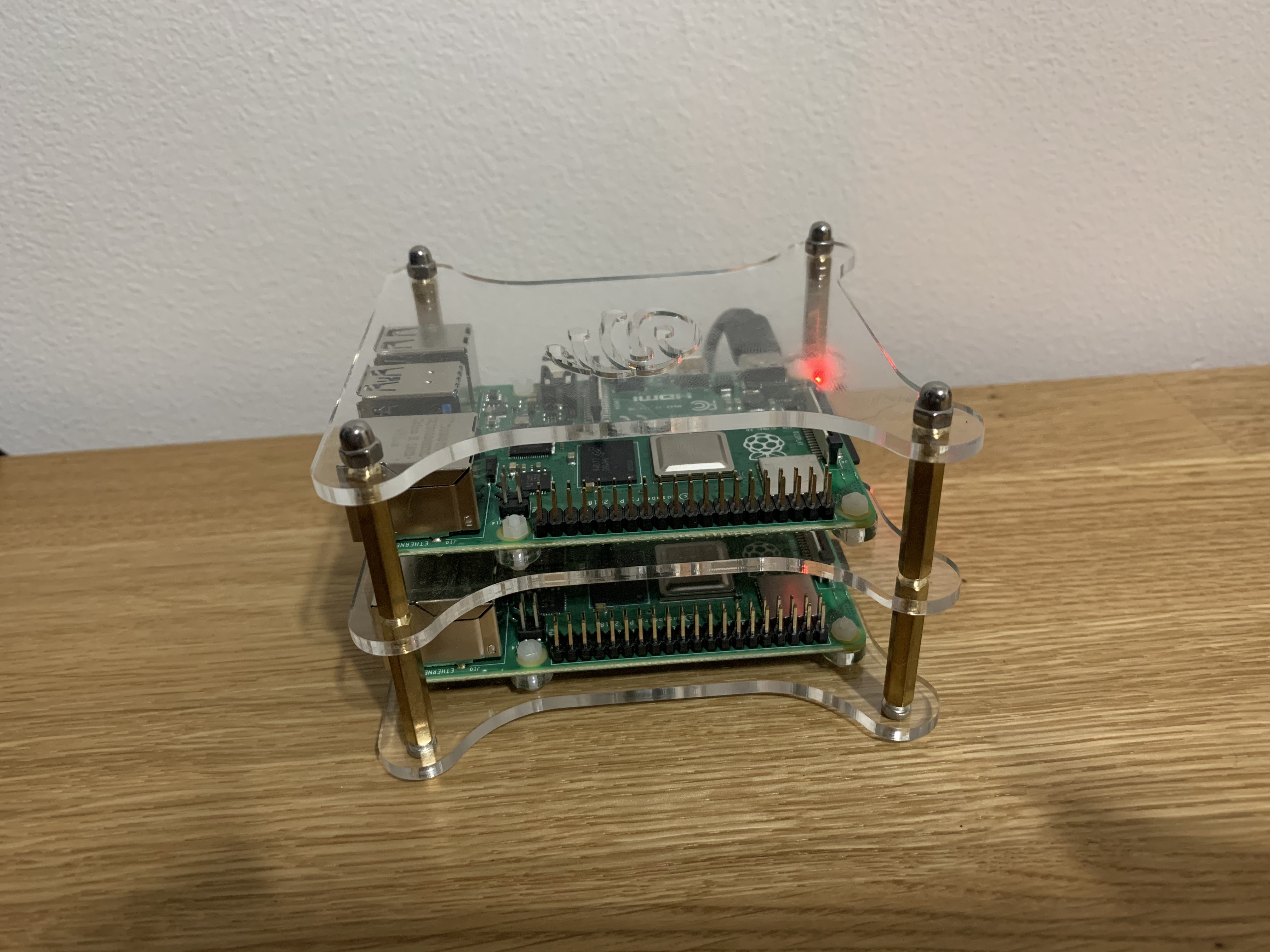
Two Pis, a pile of cables, and (as I discovered at the time) an Arc agent that couldn’t run on it because the images were amd64 only. Charming, but not exactly a platform.
So I decided to rebuild it properly. The twist is that I didn’t type most of it. I sat in a terminal on my Mac, described what I wanted in plain English, and let an AI coding agent do the typing. I made the calls; it ran the commands. The whole series (nine parts, fortnightly) comes out of that one build, which was 63 commits over about 24 hours, sleep included.
This post will cover why I picked MicroK8s, the node prep, the kernel gotcha that nearly derailed the day, forming a three-node HA cluster, and what working with the agent was actually like. Let’s dive in!
What I’m Building (and Why MicroK8s)
The hardware is three Raspberry Pi 4 Model B boards (4 GB RAM, 64 GB SD cards) running Raspberry Pi OS based on Debian 13 ("trixie"). In this series I’ll use 192.168.1.x for the node addresses.
For the Kubernetes distribution I went with MicroK8s. Think of it as a full Kubernetes that arrives as a single snap package: one install command per node, and the control plane, kubelet and container runtime come along in the box. When you have three or more nodes it turns on high availability automatically, using dqlite as the clustered datastore instead of etcd. Add-ons such as DNS and ingress are one microk8s enable away.
The honest trade-off: k3s is the other obvious choice for a Pi, and I haven’t benchmarked the two against each other here. I picked MicroK8s because the HA story and the add-ons are built in and I wanted to get to the interesting parts quickly. In my opinion that is the right call for a lab, but Part 7 covers what it cost me on the patching side.
Every node is both control plane and worker. With 3.8 GB of usable RAM per Pi, memory is the scarce resource for this entire series, so every component I add will come with a real number attached.
Prepping the Nodes
Before MicroK8s will run happily on a Pi, two things need sorting. Neither is hard, but both bite if you skip them.
First, the Raspberry Pi kernel ships with the memory cgroup controller switched off, and Kubernetes needs it. Canonical’s Raspberry Pi guide says to append two boot parameters to cmdline.txt. This command backs the file up and adds them only if they aren’t already there:
sudo cp -n /boot/firmware/cmdline.txt /boot/firmware/cmdline.txt.bak
grep -q cgroup_memory=1 /boot/firmware/cmdline.txt \
  || sudo sed -i '1 s/$/ cgroup_enable=memory cgroup_memory=1/' /boot/firmware/cmdline.txt
cmdline.txt must stay a single line, which is why the sed appends to line 1 instead of adding a new one.
Second, Debian doesn’t ship snapd, and MicroK8s is a snap. So I installed it and rebooted, then checked that the memory controller appeared:
sudo apt-get update
sudo apt-get install -y snapd
sudo systemctl reboot
# after boot, `memory` must be listed:
cat /sys/fs/cgroup/cgroup.controllers
# cpuset cpu io memory pids
Note: If memory is missing from that list, don’t carry on. Nothing fails loudly; the node just never becomes Ready and you waste an evening reading kubelet logs. Check it on every node before moving on.
Installing MicroK8s (and the Channel I Didn’t Use)
The Canonical guide installs --channel=1.30. I use the 1.36 track instead, and I’ll tell you why in the agent section below. A snap channel is a track (the Kubernetes minor version) plus a risk level, and per the MicroK8s docs, following a specific track means you only get patch releases and never a surprise new minor. That is exactly what I want on a cluster I don’t intend to babysit:
sudo snap install microk8s --classic --channel=1.36/stable
sudo usermod -aG microk8s admin   # takes effect on next login
The first small gotcha: on Debian, /snap/bin isn’t in sudo’s secure_path, so sudo microk8s status returns "command not found". Either use sudo /snap/bin/microk8s ... or, once you’re in the microk8s group, drop the sudo entirely.
The Kernel Gotcha: 65 Crashloops
Then the big one. With 1.36 installed, microk8s status said "not running", and the kubelite service had restarted 65 times within minutes. The journal said:
modprobe: FATAL: Module ip_tables not found in directory /lib/modules/6.18.50+rpt-rpi-v8
Error: iptables is not available on this host : error listing chain "POSTROUTING" in table "nat"
F... daemon.go:47] Proxy exited iptables is not available on this host
In English please: kube-proxy is the component that turns a Kubernetes Service address into "go to one of these pods". By default it does that by writing iptables rules. The Raspberry Pi 6.18 kernel has the newer nf_tables but no legacy ip_tables module, and the iptables binary bundled in the MicroK8s snap is the legacy flavour. So kube-proxy fails on start, and because it runs inside kubelite, it drags the whole control plane down with it.
The fix is to tell kube-proxy to use its nftables mode (which needs kernel 5.13 or later) by adding one flag:
f=/var/snap/microk8s/current/args/kube-proxy
grep -q proxy-mode $f || echo "--proxy-mode=nftables" | sudo tee -a $f
sudo systemctl restart snap.microk8s.daemon-kubelite
That is the entire fix. The agent applied it to node 1 as a canary, confirmed kubelite stayed up, then rolled it to the other two. The setting survives joins and reboots, but I re-check it after every MicroK8s minor upgrade (more on that in Part 7).
Be warned: this one flag has ripple effects. The same missing ip_tables module is why the ingress add-on’s hostPort defaults can’t work on this kernel, and I’ll get to that in Part 5.
Forming the HA Cluster
With all three nodes healthy individually, forming the cluster is pretty straightforward. On node 1 I generate a single-use join token, then run the printed command on node 2. Repeat with a fresh token for node 3:
sudo /snap/bin/microk8s add-node --format short
# -> microk8s join 192.168.1.x:25000/<token>/<cert-hash>
sudo /snap/bin/microk8s join 192.168.1.x:25000/<token>/<cert-hash>
With the third node in, MicroK8s turned on HA by itself:
$ microk8s status
microk8s is running
high-availability: yes
  datastore master nodes: 192.168.1.x:19001 192.168.1.x:19001 192.168.1.x:19001
The agent also merged the new cluster into my kubeconfig under a context named rpi-k8s, after backing up ~/.kube/config first. MicroK8s defaults call everything microk8s and admin, and I had an old microk8s context lying around from the bricked cluster. Renaming avoids pointing kubectl at the wrong cluster, which is a lesson you only want to learn once.
The Power-Cut Test
An always-on desk cluster should survive someone tripping over a power strip. So I rebooted all three nodes at once, the closest thing to a power cut I was willing to simulate. SSH came back after about 45 seconds and all three nodes were Ready with HA quorum after about 65. Kubelite had zero restarts, and DNS recovered without help.
A word from the wise: dqlite is a Raft-based datastore, so it needs a majority of voters. With three nodes you can lose one. Lose two and the API stops. The rule I now live by is one node at a time, and never take two down together. That rule gets written into the agent’s instructions later in this series.
The Weakest Link
All three nodes are on Wi-Fi. It works, but dqlite consensus and the pod network are latency sensitive, so Wi-Fi is the most likely cause of a flapping node. Ethernet is on my to-do list. Until then, this is a cluster for learning and light home use, not for anything you’d lose sleep over.
One more bit of prep: snap refreshes. By default every node would auto-refresh on its own schedule, so I staggered each node’s refresh window (Sunday 02:00, 03:30 and 05:00) so they never restart together. Combined with the 1.36 channel pin, that means only patch releases arrive, one node at a time.
Working with the Agent
So how did the build actually go? Here is the pattern, which held for the whole series. I type a request. The agent runs commands on the Pis over SSH, writes manifests and docs, and commits to Git. I decide scope, spend, and anything that touches Azure. When the agent is about to do something destructive or costly, it stops and asks.
Part 1 had a couple of nice examples of that split.
Version choice was mine. The agent started by following the Canonical guide to the letter and installed 1.30. Midway through, I interrupted: "if there is a more recent version of microk8s, we should be using that!" The agent purged it and reinstalled 1.36/stable. As a side effect, a Python LookupError: unknown encoding: ascii traceback appeared, from the old snap being removed underneath a running microk8s status. Harmless, but alarming for about three seconds.
The kernel problem was the agent’s to solve. It read the journal, worked out that the 6.18 kernel had no legacy ip_tables, found the nftables proxy mode, tried it on one node first and only then rolled it out. That is the same path I’d have taken myself, just with a lot less searching.
Sudo was my call too. The nodes needed a password for sudo, and I wasn’t going to hand my password to an agent. So I enabled passwordless sudo on the nodes myself, a trade-off I wrote down as a hardening item rather than pretending it isn’t one.
Where was it wrong? Its first instinct was to trust the 2024-era guide, and it didn’t think to question the channel until I pushed. It’s a good reminder that these tools read documentation like I do, which is to say confidently and sometimes a version behind. Part 9 digs into this properly, including the rules I eventually wrote down for it in an AGENTS.md file.
Wrapping Up
I now have a three-node MicroK8s 1.36 HA cluster on Raspberry Pi 4s that survives a simultaneous power cut, on the back of one kernel flag, a boot parameter and a pinned channel. That was the easy bit. In the next part I’ll move everything into Git with Flux and encrypt the secrets with SOPS, before the drift sets in.
As always, feel free to reach out with any questions or comments!
Up Next
- Rebuilding My Desk Kubernetes Cluster, Five Years On (this post)
- GitOps and Secrets with Flux and SOPS
- Workload Identity Without AKS
- Entra ID for kubectl, Five Years After Okta
- Ingress, Certificates and Getting Home Through CGNAT
- Hardening a Home Cluster, and How I Broke It
- Keeping It Patched Without Babysitting It
- One LLM Gateway for Everything, with a Hard $100 Cap
- What I Learnt Building It with an AI Agent
Until next time, stay cloudy!


